
Free Text to Handwriting Converter for Students
BlogPublished on March 5, 2026
A text-to-handwriting converter is a simple online tool that converts typed text into handwritten-looking text. You type normally on your keyboard, and the tool makes it look like you wrote it by hand. It's free, easy to use, and requires no downloads or sign-ups.
Why It's Gaining Popularity Among Students
Students are using handwriting converters for several key reasons:
- Saves Time Writing by hand takes hours. With a converter, you can finish assignments in minutes by typing instead.
- Neat and Professional. Not everyone has neat handwriting. This tool ensures your work always looks clean and organized easy for teachers to read.
- Less Hand Pain. Long writing sessions cause hand and wrist pain. Typing is easier on your body.
- Multiple Style Choices Choose from different handwriting styles that match your personality – elegant, playful, neat, or casual. Your work looks unique and personal.
- Works Everywhere Use it on your computer, tablet, or phone. No special software needed – just open your browser.
- Completely Free. No hidden costs. It's free for everyone.
- Your Privacy is Safe. Your work stays private. The tool doesn't save or share your personal information.
How Does Text-to-Handwriting Conversion Work?
Technology Behind Handwriting Converters
Handwriting converters use special computer fonts designed to look like real handwriting. Artists create these fonts by drawing letters by hand, then converting them into digital format. If you want to learn more about the process of using such tools, check our guide on How to Convert Typed Text into Handwritten Assignment. The tool applies these fonts to your typed text and adds small details like wobble, slant, and spacing variations to make it look more natural and authentic.
Step-by-Step Process Explained
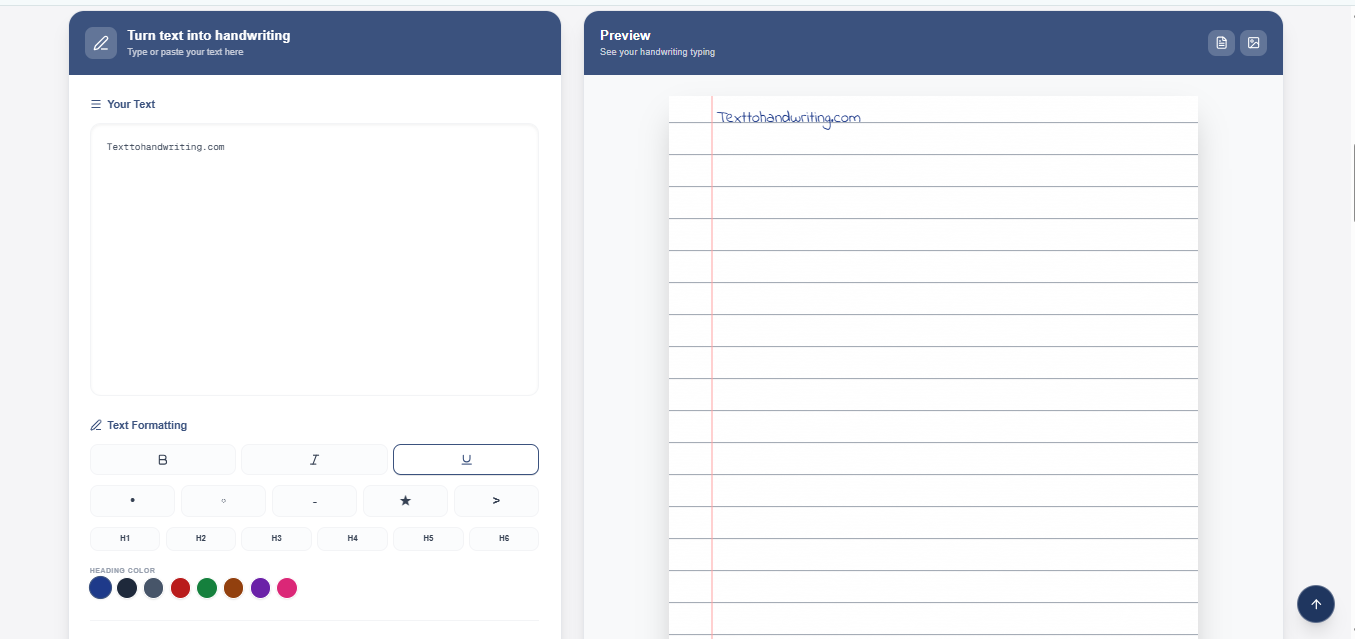
Step 1: Type Your Text. Open the tool and type or paste your assignment in the text box.
Step 2: Choose a Handwriting Style. Pick from different handwriting fonts (neat, casual, elegant, cursive, etc.). Your preview updates instantly.
Step 3: Customise Adjust font size, ink color (blue, black, red), paper type (lined, plain, grid), and wobble for realism.
Step 4: Preview. See exactly how your final work will look before downloading.
Step 5: Download and save your work as a PNG or PDF.
Step 6: Print or Submit. Print on paper or upload to your teacher. It looks like real handwriting.
Benefits of Using a Free Handwriting Converter for School Assignments
Time-Saving Advantages
Writing assignments by hand takes hours. With a handwriting converter, you can finish in minutes. Just type your text, choose a style, and download. You save time and can focus on other homework or activities.
Quality and Authenticity
Your converted handwriting always looks neat and professional. No messy letters or spelling mistakes that are hard to read. Teachers can understand your work clearly. The tool creates realistic-looking handwriting that looks genuine – not computer-generated.
Accessibility and Convenience
You can use the tool anytime, anywhere, on any device (computer, tablet, phone). No downloads needed. No sign-ups required. Just open your browser and start. It's completely free with no hidden costs or paid features.
Step-by-Step Guide: How to Use Our Text to Handwriting Tool
Creating Your First Assignment
1. Go to the Website Open textohandwritting.com in your browser.
2. Enter Your Text Click on the text box and type or paste your assignment, essay, notes, or letter.
3. Select a Handwriting Style Choose from styles like Indie Flower, Cursive, Elegant, Playful, Neat Print, Messy, or School bell. Click on any style to see it in the preview.
4. See Your Preview Your text instantly shows in the handwriting style you chose. If you like it, move to customization. If not, try another style.
Customization Options
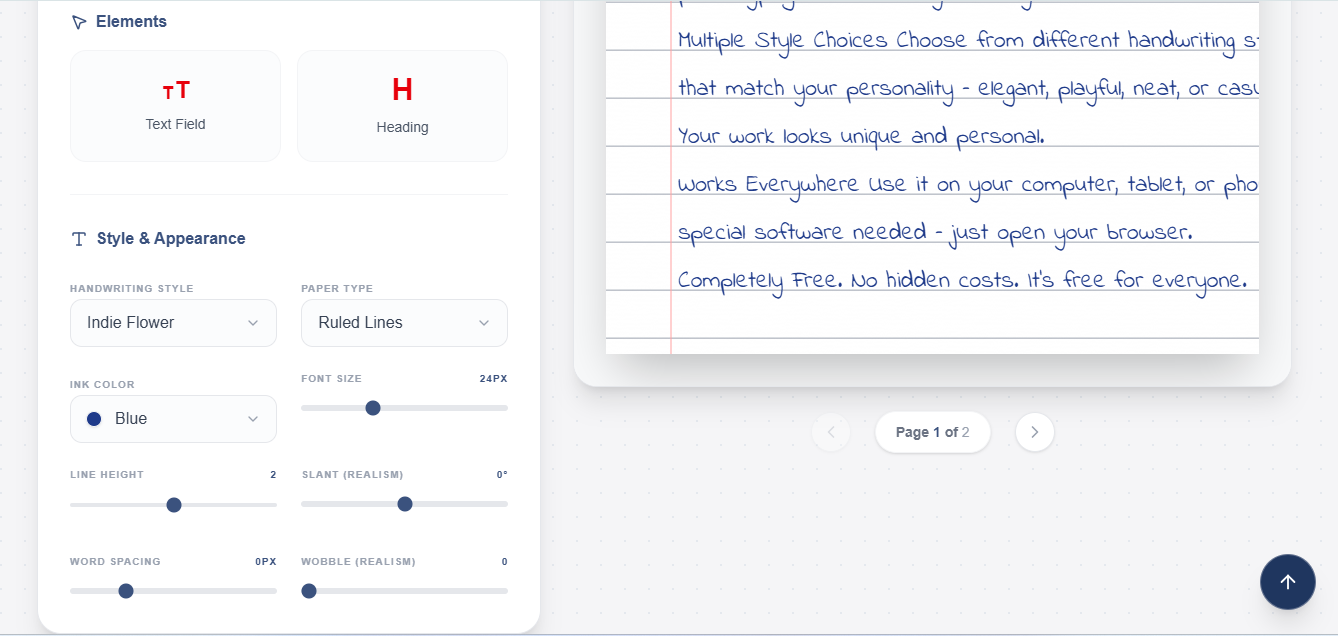
Make your handwriting unique by adjusting:
- Font Size: Make text bigger or smaller (24px to larger sizes)
- Ink Color: Choose blue, black, red, green, or purple
- Paper Type: Select lined, plain white, grid, vintage, notebook, floral, or parchment backgrounds
- Line Height: Control space between lines
- Wobble: Add realistic shake to letters (0 for perfect, higher for more natural)
- Slant: Tilt letters left or right for realism
- Word Spacing: Adjust gaps between words
All changes show in real-time preview.
Downloading and Printing
1. Check Your Preview Make sure everything looks good before downloading.
2. Download Your File Click the download button and choose:
- PNG: Save as image file (good for email or uploading)
- PDF: Save as document (good for printing)
3. Print or Submit Print on paper and submit to your teacher, or upload the file digitally. Either way, it looks like real handwriting.
Free vs. Paid Handwriting Converters: What's the Real Difference?
| Feature | Free Tool (Our Tool) | Paid Tools |
| Basic Handwriting Styles | ✅ 20+ styles | ✅ 20+ styles |
| Ink Colors | ✅ 5 colors (blue, black, red, green, purple) | ✅ 5-10 colors |
| Paper Types | ✅ 20+ options (lined, grid, vintage, floral, etc.) | ✅ 20+ options |
| Font Size Adjustment | ✅ Yes | ✅ Yes |
| Line Height Control | ✅ Yes | ✅ Yes |
| Wobble & Slant | ✅ Yes | ✅ Yes |
| PNG Download | ✅ Yes | ✅ Yes |
| PDF Download | ✅ Yes | ✅ Yes |
| Sign-up Required | ❌ No | ⚠️ Usually yes |
| Cost | ✅ Free | ❌ $5-$20/month |
| Ads | ⚠️ May have ads | ❌ No ads |
| Advanced Features | ❌ Limited | ✅ Batch processing, API access |
| Customer Support | ⚠️ Basic | ✅ Priority support |
How Does Text-to-Handwriting Conversion Work?
Technology Behind Handwriting Converters
Handwriting converters use special computer fonts designed to look like real handwriting. Artists create these fonts by drawing letters by hand, then converting them into digital format. The tool applies these fonts to your typed text and adds small details like wobble, slant, and spacing variations to make it look more natural and authentic.
Step-by-Step Process Explained
Step 1: Type Your Text. Open the tool and type or paste your assignment in the text box.
Step 2: Choose a Handwriting Style. Pick from different handwriting fonts (neat, casual, elegant, cursive, etc.). Your preview updates instantly.
Step 3: Customise Adjust font size, ink colour (blue, black, red), paper type (lined, plain, grid), and wobble for realism.
Step 4: Preview. See exactly how your final work will look before downloading.
Step 5: Download and save your work as a PNG or PDF.
Step 6: Print or Submit. Print on paper or upload to your teacher. It looks like real handwriting.
Conclusion
"Writing by hand takes time. Our text-to-handwriting converter creates professional, authentic handwritten work in minutes completely free with no sign-ups. Get 20+ styles, full customization, and high-quality downloads. Stop struggling with pen and paper. Start using our tool today to finish assignments faster. It's easy, free, and works perfectly."