

How to Convert Text to Cursive
BlogPublished on March 6, 2026
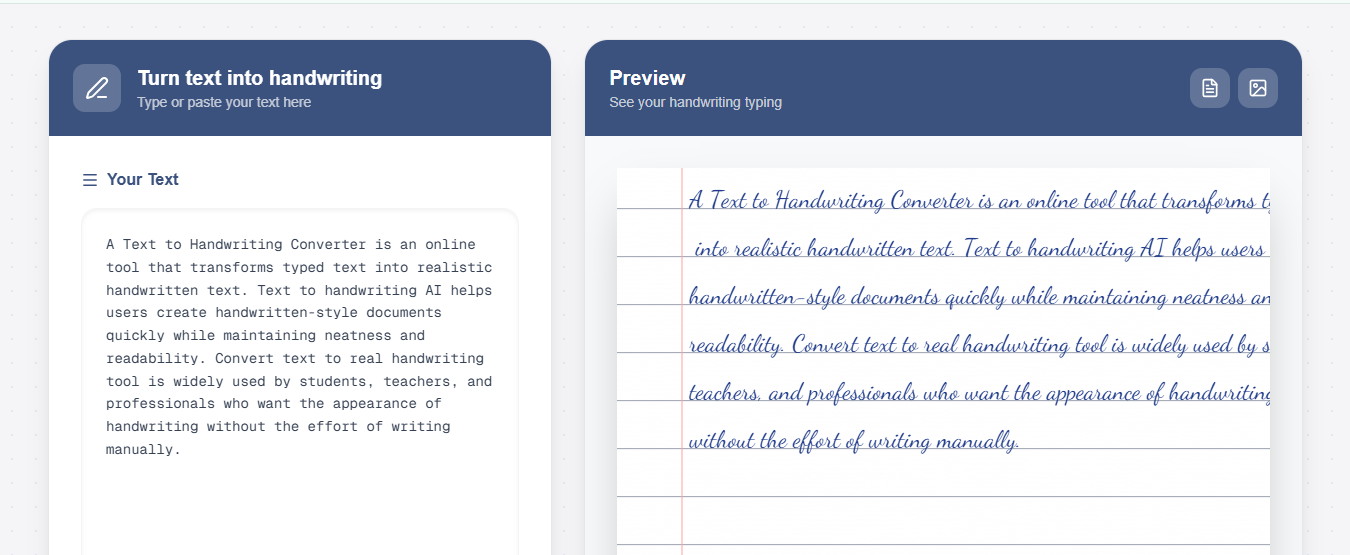
A cursive text generator is a free online tool that converts regular typed text into beautiful cursive writing. Instead of writing by hand, you simply type your text, and the tool instantly transforms it into elegant cursive. It works like this: your keyboard letters become flowing, connected cursive. The tool uses special fonts to give your words a handwritten look in seconds.
What Makes It Useful?
A cursive generator offers speed, clarity, and consistency that handwritten text often cannot guarantee. With our Free Text to Handwriting Converter for Students, you can quickly transform typed text into neat, stylish cursive handwriting within seconds. It removes the need for perfect handwriting skills while ensuring the output looks clean, readable, and professionally styled every time.
- Creating elegant social media captions
- Designing personal letters and cards
- Making creative projects look professional.
- Adding personality to digital documents
- Saving time on artistic projects
The best part? Most cursive generators are completely free and require no downloads or sign-ups.
How Cursive Text Generators Work
Understanding cursive generators is simple. Let’s break it down:
The Technology Behind It
Cursive generators don't use AI or magic. They rely on digital fonts pre-designed letters and characters that mimic cursive.
Here's what happens step-by-step:
- You Type Your Text. You enter regular text into the tool using your keyboard. This text looks normal, just like typing an email.
- The Tool Applies a Cursive Font. The generator converts your typed letters into cursive. It's similar to changing font style in Microsoft Word or Google Docs. Instead of Arial or Times New Roman, it uses a cursive typeface.
- It Adds Realistic Details. Modern cursive generators don't just change the font. They add small details to make it look more authentic and handwritten.
These details include:
- Natural variations in letter size
- Slight spacing differences between letters
- Flowing connections between letters
- Authentic slant and angle
- Subtle wobble for a realistic appearance.
You can copy or download it. Once the cursive text is created, you can copy it to use anywhere – social media, documents, emails, or download it as an image.
Benefits of Using a Free Cursive Generator
Using a cursive generator offers many advantages. Here's why so many people prefer them.
Time-Saving
Writing cursive by hand takes time. For multiple posts or documents, handwriting each would take hours. With a generator, you create elegant cursive text in seconds.
Perfect Quality Every Time
Not everyone has beautiful cursive handwriting. Some people write messy cursive. Others haven't practiced cursive in years and have forgotten how to write it. With a generator, every single piece of cursive text looks perfect and professional. No messy letters. No inconsistencies.
Works on All Devices
You can use a cursive generator on a computer, tablet, or phone. No special software is needed—just open your browser and start.
Completely Free
Most quality cursive generators are 100% free. No costs or subscriptions. No charge for downloading. Free to use, always.
No Sign-Up Required
No account or email needed. Visit the website, generate cursive text, and go. It's simple and fast.
Your Privacy is Protected
Your text stays private and secure. The tool doesn’t collect personal information or track your actions.
Adds Elegance and Personality
Cursive writing is more elegant and personal than regular text. It adds style to any project, making posts sophisticated and messages heartfelt.
How to Use Our Cursive Generator: Complete Guide
Using our cursive text generator is simple. Even non-tech users can use it in seconds.
Visit the Website
Open textohandwriting.com in your web browser on any device.
Find the Text Input Box
Look for the input box labelled "Your Text" or "Type or paste your text here." This is where you'll enter your text.
Type or Paste Your Text
Click in the box and type your message, or copy and paste from elsewhere. You can enter a:
- A single word
- A full sentence
- Multiple paragraphs
- Any text you want converted to cursive.
Choose Your Cursive Style
The tool shows relevant cursive font styles to choose from, including:
- Classic cursive (traditional flowing style)
- Elegant cursive (formal and sophisticated)
- Modern cursive (contemporary style)
- Script cursive (smooth and connected)
- And many more styles
Click on any style to see your text instantly previewed in that style. Pick whichever style you like best.
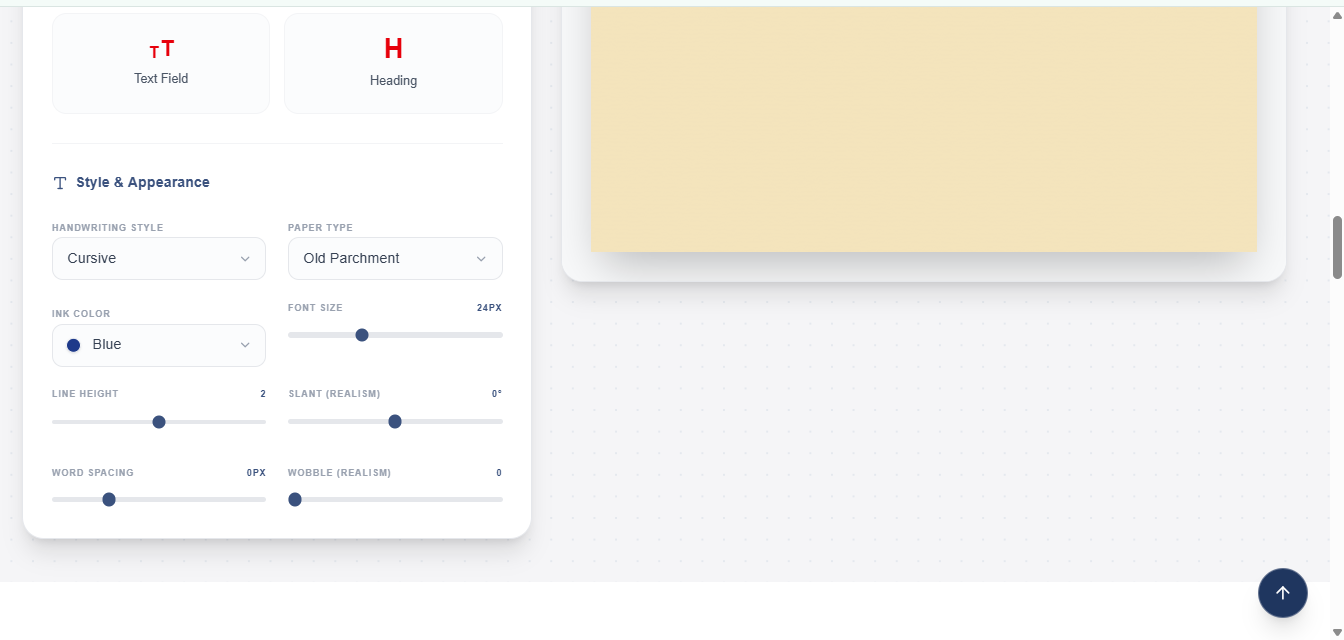
Customize Your Cursive Text:
You can make adjustments to match your preferences:
- Font Size: Make text bigger or smaller
- Ink Color: Choose different colors (blue, black, red, green, purple)
- Paper Background: Select different backgrounds (plain, lined, grid, vintage, etc.)
- Line Height: Control space between lines
- Wobble: Add more or less "handwritten" feel
- Slant: Tilt letters for a realistic appearance
- Word Spacing: Adjust gaps between words
All changes show instantly, so you see your final result as you adjust.
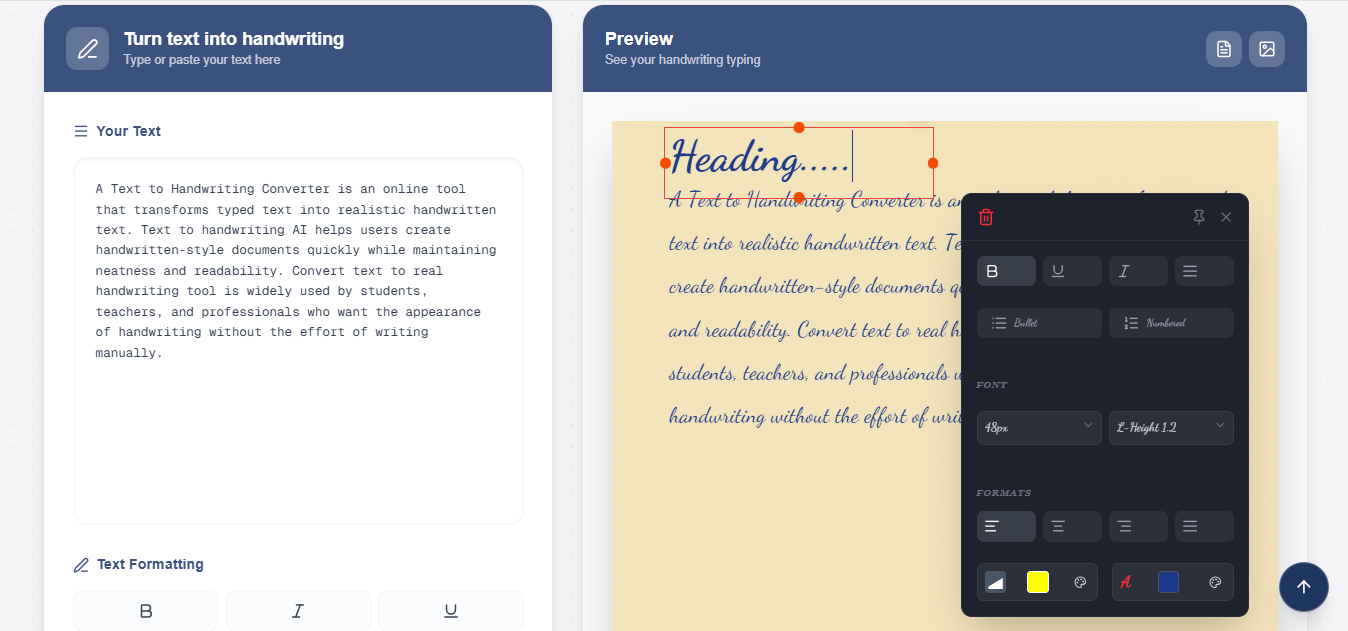
Preview Your Cursive Text
Preview your cursive text on the right. Check it before proceeding.
Copy Your Text
Once you're satisfied, you can copy the text directly to use anywhere:
- Paste into social media (Instagram, Facebook, Twitter, TikTok)
- Paste into documents (Google Docs, Word, email)
- Paste into messaging apps (WhatsApp, Discord, etc.)
Most platforms accept cursive text as copyable content.
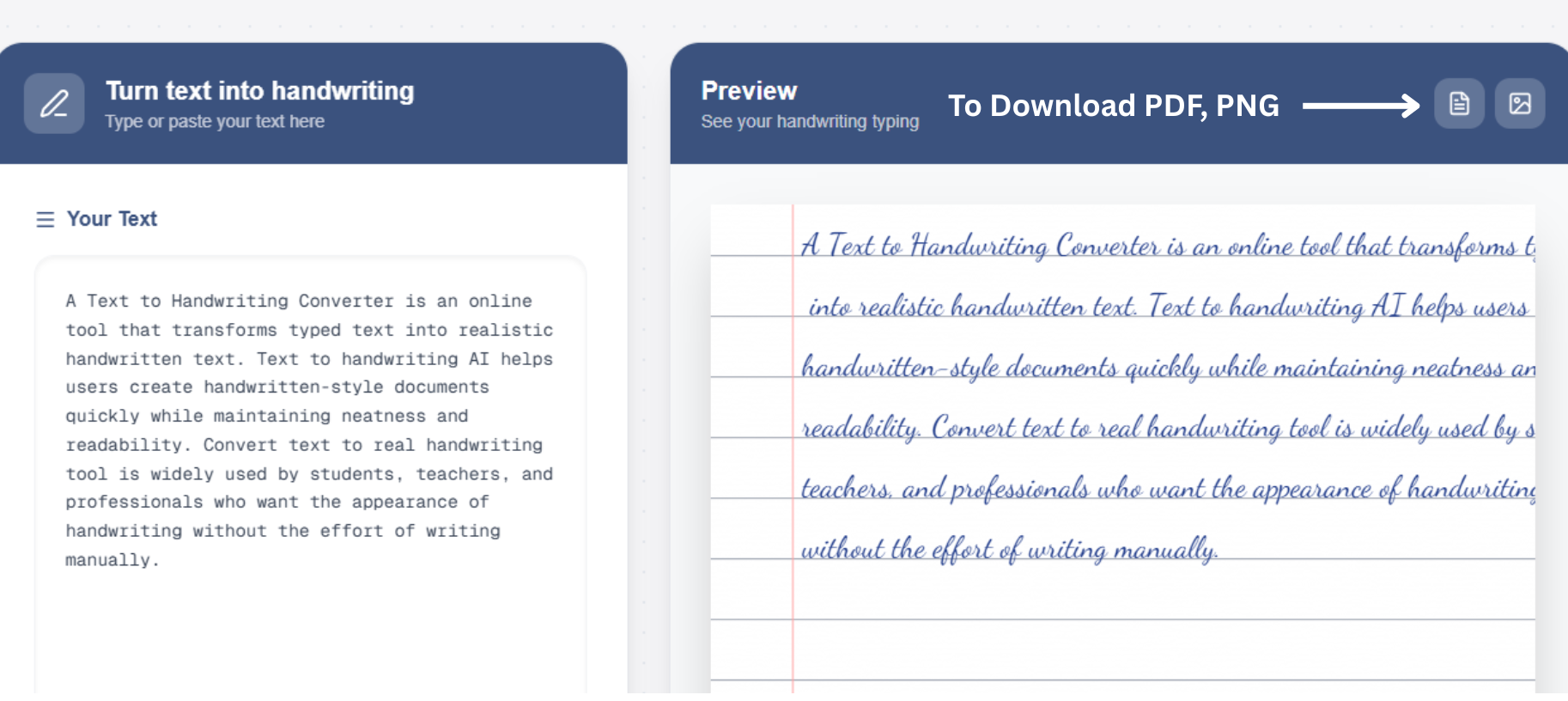
Download:
To save your cursive text to download it as:
- PNG: A high-quality image file (good for sharing, printing)
- PDF: A document file (good for official use, printing)
Pro Tips for Best Results
- Start with short text for the best effect.
- Test different styles to find your favorite.
- Use darker colors for better readability.
- Adjust wobble moderately – too much looks messy.
- Check the preview carefully before copying.
Where You Can Use Cursive Text
Cursive text from a generator works in many places. Here's where you can use it.
Social Media Platforms
- Instagram: Use cursive text in your bio, captions, and comments. Cursive text makes your profile more elegant and stands out from regular text.
- Facebook: Add cursive text to posts and messages to make them more personal and eye-catching.
- TikTok: Use in captions and on-screen text to add style to your videos.
- Twitter/X: Make your tweets more memorable with cursive text.
- LinkedIn: Add professional-looking cursive text to posts and messages.
- Pinterest: Use cursive text in descriptions and comments.
- Reddit: Make your comments and posts stand out with cursive text.
Personal Projects
- Wedding Invitations: Cursive text looks elegant on wedding announcements and invitations.
- Birthday Cards: Add personalization to digital or printed birthday messages.
- Thank You Notes: Cursive makes thank you messages feel more sincere and heartfelt.
- Love Letters: Express feelings with beautiful cursive text.
- Personal Journaling: Use in digital or printed journals for artistic effect.
Academic and Professional
- School Projects: Create eye-catching titles and headers for presentations.
- Decorative Elements: Add artistic elements to reports or essays.
- Google Docs: Paste cursive text into documents for creative formatting.
- Email: Make important emails or signatures more elegant.
- Resumes: Add a personal touch (use carefully and professionally).
Creative Projects
- Graphic Design: Use as text elements in designs.
- Social Media Graphics: Included in Instagram posts, Pinterest pins, etc.
- Digital Art: Incorporate into artistic projects.
- Blogs and Websites: Use in headers or decorative text.
- Posters and Flyers: Create attractive promotional materials.
Everyday Communication
- Text Messages: Send stylish messages to friends and family.
- Discord or Gaming: Stand out in chat with elegant cursive text.
- Comments and Feedback: Make your online comments more memorable.
- Dating Apps: Make your profile more attractive with cursive text.
Cursive Font Styles & Examples
Our cursive generator offers many different styles. Let's explore some popular options.
Traditional Cursive
- What It Is: Classic cursive writing style taught in schools. Letters are beautifully connected and flow smoothly.
- Best For: Formal documents, invitations, professional communication.
- Example Look: Flowing, connected letters with elegant loops.
Modern Cursive
- What It Is: Contemporary cursive style that's cleaner and less elaborate than traditional cursive.
- Best For: Social media, casual personal use, creative projects.
- Example Look: Clean lines, modern feel, easy to read.
Elegant Script
- What It Is: Fancy, sophisticated script style with flourishes and decorative elements.
- Best For: Special occasions, artistic projects, wedding-related content.
- Example Look: Ornate letters with decorative swirls.
Playful Cursive
- What It Is: Fun, casual cursive style that's friendly and approachable.
- Best For: Casual social media, personal messages, creative posts.
- Example Look: Loose, friendly, full of personality.
Formal Script
- What It Is: Professional, refined cursive style suitable for formal use.
- Best For: Business communication, official documents, formal invitations.
- Example Look: Clean, professional, highly legible.
Brush Script
- What It Is: Cursive style that mimics brush pen writing. Bold and artistic.
- Best For: Graphic design, posters, artistic projects.
- Example Look: Bold strokes, artistic appearance.
How to Choose the Right Style
- For Social Media: Use modern or playful cursive – they're eye-catching and readable.
- For Formal Use: Choose an elegant or formal script – it looks professional and sophisticated.
- For Fun/Casual: Pick playful cursive – it's friendly and fun.
- For Creative Projects: Experiment with different styles to find the one that matches your vision.
- Pro Tip: Different styles work better on different backgrounds and colors. Test your chosen text with different styles before finalizing.
Free vs Paid Cursive Generators
You might wonder if you should pay for a premium cursive generator. Let's compare.
Detailed Feature Comparison
| Feature | Our Generator | Word Processors | Paid Tools |
| Cursive Styles Available | ✅ 15+ beautiful styles | ✅ 3-5 basic styles | ✅ 20+ professional styles |
| Ink Color Options | ✅ 5 colors (blue, black, red, green, purple) | ✅ Limited colors | ✅ 10+ custom colors |
| Paper Backgrounds | ✅ 10+ options (lined, grid, vintage, floral) | ❌ Limited or none | ✅ 20+ options |
| Font Size Control | ✅ Full range | ✅ Yes | ✅ Yes |
| Line Spacing Control | ✅ Yes | ✅ Yes | ✅ Yes |
| Wobble/Realism Effect | ✅ Yes | ❌ No | ✅ Advanced |
| Download PNG | ✅ Yes (High Quality) | ✅ Yes | ✅ Yes |
| Download PDF | ✅ Yes | ✅ Yes | ✅ Yes |
| Sign-up Required | ❌ NO | N/A | ⚠️ Usually yes |
| Monthly Cost | ✅ FREE Forever | ✅ Free (if you have Word) | ❌ $5-$20/month |
| Ads | ⚠️ Minimal | N/A | ❌ No ads |
| Realistic Output | ✅ Very realistic | ⚠️ Obvious computer font | ✅⭐ Most realistic |
| Batch Processing | ❌ No | ❌ No | ✅ Yes (Paid only) |
| API Access | ❌ No | N/A | ✅ Premium feature |
| Custom Font Upload | ❌ No | N/A | ✅ Premium feature |
| Priority Support | ⚠️ Basic | N/A | ✅ Priority |
| Mobile Friendly | ✅ Fully responsive | ⚠️ Limited | ✅ Full |
| Works Offline | ❌ Requires internet | ✅ Yes | ❌ Requires internet |
| Learning Curve | ✅ Super easy (2 minutes) | ⚠️ Medium | ⚠️ Medium |
Why Our Free Tool is All You Need
For most people, our free cursive generator has everything you need:
- 15+ beautiful cursive styles to choose from
- Full customization options (colours, sizes, backgrounds, effects)
- High-quality downloads in PNG and PDF
- Works on all devices with no downloads needed
- No registration or sign-ups
- No hidden costs whatsoever
- Instant results – convert in seconds.
- Mobile-friendly interface
- Privacy protected – your text stays private.
You get professional results completely for free.
When Might You Consider Paid Options?
You need only a paid tool if you:
- Need AI-powered handwriting that mimics personal handwriting styles exactly
- Want to convert hundreds of texts at once (batch processing)
- Want to upload your own handwriting sample to create custom fonts.
- Want to build an app that uses cursive conversion (API access)
- Need to remove ads from the interface.
- Need priority customer support.
- Want commercial licensing for business use.
Most users never need these features. For social media, creative projects, personal letters, school work, and everyday use, our free tool is perfect and does everything you need.
Why Manual Writing Isn't Always Practical
While handwriting cursive manually is beautiful, here's why many people prefer generators:
Problems with Manual Writing
- Takes 10-20 times longer than using a generator
- Requires good cursive handwriting skills
- Hand pain and fatigue from extended writing
- Inconsistent results if not practiced regularly
- Mistakes mean starting over.
- Not practical for large amounts of text
- Requires specific materials and setup
Advantages of Using Our Cursive Generator
- Instant results in seconds
- Perfect consistency every time
- No hand pain or fatigue
- No special materials needed
- Easy to edit and try different styles
- Works on any device, anywhere
- Free and accessible to everyone
Why Word Processor Fonts Fall Short
Microsoft Word and Google Docs have cursive fonts, but they have major limitations:
Limitations of Word Processor Fonts:
- Only 3-5 basic cursive font options
- Look obviously computer-generated
- No background options (plain white only)
- Limited color choices
- Can't add realistic effects like wobble or slant
- Letter connections look unnatural.
- Not as customizable as real generators
- Doesn't scale well for different purposes
Our Generator is Better Because:
- 15+ different styles vs 3-5 in Word
- Looks realistic and handwritten
- Multiple background options (lined, grid, vintage, floral, etc.)
- Better customization controls
- More natural letter connections
- Can add realistic handwriting effects
- Specifically designed for cursive output
- Higher quality results for printing
Conclusion
"Writing beautiful cursive by hand takes time and skill. Our free cursive text generator solves this problem instantly – transform regular text into elegant, flowing cursive in seconds with dozens of gorgeous styles, full customization, and high-quality downloads, completely free with no sign-ups required. Stop struggling with pen and paper or expensive design tools. Start using our free cursive text generator today and see the beautiful difference it makes – it's easy, it's free, and it works perfectly."